Showing posts with label Writing tips. Show all posts

Monday, March 09, 2015

The Phantom Menace: Don't start with background


Title: A proposal to supply Acme Corp. with Blagfly Macroscopic Flange 
Background: In 20187, Ignati and Wilhelmina Lightblack noticed the diminishing return on investment of industrial-size household powersource applications for lightsabres. The siblings engaged upon a ten-year research project into the optimal application of flange technology in lightsabres. A side enquiry into the efficiency of something something something dark side ...

That's what was wrong with The Phantom Menace — Chapter One of the Star Wars epic. It was all background.

No one wants to read background. If they do read it, it's because they thought they had to.

One element that made the first Star Wars movie work (Episode Four, "A New Hope") was that it started with action and immediately put the audience into a fully realized universe. That's also part of the appeal of The Hobbit (the book) and George RR Martin's A Song of Ice and Fire series. The authors have developed complete, consistent worlds, and all the elements they present fit together consistently.

In other words, the author has done the background research, but doesn't force it on the audience.

This principle applies just as well to non-fiction and business communications like proposals and reports. No one wants to wade through background information. They want the point, first. 

Luke Skywalker did not stop to read the history of the Trade Federation, the blockade of Naboo, the destruction of the Jedi Order and the establishment of the Empire. No. His reaction to Princess Leia's message was "She's beautiful. I have to help her by finding Obi-Wan Kenobi." 


Thesis first, background later

Recently, I received a number of reports and proposals that begin with extensive background. 
Page after page of background. 
The authors felt that the audience could not understand the thesis without knowing the background. That's intuitively correct, but the idea falls apart on the quickest analysis.

No matter what the document is, it's competing for its audience's time and attention not just with other documents and reports, but with other media (including Facebook). Before anyone decides whether to invest time in reading a report, no matter how long or short —in fact, before they decide to invest time in anything — they do a quick return-on-investment calculation: will this be worth it? 

Before they start reading, the audience needs to know why they should, and the only way they can make that calculation is if you tell them what their payoff will be. 

Start with the point — the end of your argument. "Your company needs our flanges." Then provide the reasoning that backs it up.

Like Princess Leia: "You have to help us, Obi-Wan Kenobi. You're our last hope." Thesis statement first, then the reasoning.  


Problem, solution

"But what about the problem-solution approach?" you ask. "Isn't that a good way to structure a proposal?"

Thanks for asking. Indeed, it is a good way to set up a proposal, as well as many other kinds of documents. Even a novel. But you should not front-load it with a long description of the problem. Show the oppression, quickly describe why it's a problem, and then show the reader the promised land.
Problem: We cannot tell who is coming to our website, nor what they look at most.
Solution: Lungbreath web analytics software will track who comes to the site, from where, and specifically which pages they spend the most time on. This will allow us to target sales messages and ultimately increase revenue.
Problem: Dirty Bill's restaurants have far too many rats in the kitchen. Not only will the health department shut us down if we cannot get the rat count below municipal standards by next month, the rats are eating so much of our inventory, we are losing money.
Solution: Batta's Better Mouse-Traps® will reduce the rat population in the kitchen by 50 percent in the first month, which will bring the restaurants within Health Department standards. Thus, we will stay in business! 

Write it in reverse

I often find that the best way to do this is to write the introduction last. As the writer, you may find it easier to write the background first. This helps you to understand the situation and its context. For example, you could describe how you first noticed the problem, explain how big a problem it is, and outline what would be the long-term impacts of not addressing the problem. 

You could introduce statistics that show the history of the problem, perhaps linking it to causes and factors that have an impact.

But this comes in the main body of your report. From that analysis, you can write an analysis of the impact of the problem. In business terms, this means how much it costs. Then you could present alternative solutions, and describe their potential impacts and costs. 

Finally, you describe the best solution, in your considered and researched opinion, and make a recommendation. That's called the conclusion. 

After you have finished writing the conclusion, you can write the introduction. Summarize the conclusion. State the solution first, then the problem and the cost of the problem.
Batta Corp.'s Better Mouse-Traps® will solve the increasing rat problem that the Dirty Bill restaurant chain has been experiencing this past year. This modest investment will not only save each location $2,000 per month in food inventory, it will prevent the Public Health Department from closing us down.

That gets the readers' attention. They'll want to read more after that. 

Monday, August 18, 2014

Rules, shmules

Photo by: Scott Kleinberg, Creative Commons
Writers are always teaching me, whether they know it or not. I’ve been editing and beta-reading manuscripts for a number of people this summer, and their words make me re-evaluate some ideas I held firmly for some time. And I keep coming to the same dilemma: at what point does trimming text and adhering to the current stylistic conventions begin to trample legitimate expressions of writing style?

Every writer has heard of Elmore’ Leonard’s “Ten Rules for Good Writing.” You can Google them easily enough.

And it seems to me that the “rules” thrown around by those who claim to be publishing professionals and insiders are often contradictory. For instance, real professional authors don’t use adverbs much, if at all. I once heard an author in a radio interview claim proudly (there’s another adverb, damnit!) that he only had three or four adverbs in his whole book.

Then there’s the dilemma over dialog. “Never use a word other than ‘said’ to describe dialog,” advised Mr. Leonard. Also, never modify “said” with an adverb.

Meanwhile, I read some time ago that a large number of grade-school teachers across the US encouraged their pupils never to use “said” in their compositions. They could use “exclaimed,” “asked,” “replied,” “retorted” or anything else that made sense, but not “said.”

In providing a beta-read for a good friend’s new manuscript, I couldn’t bring myself to follow either rule. Now, there were times that I thought “said” was the right word, and I suggested that to my best-selling friend. But sometimes, as a writer, you want to describe how someone spoke. So you need either a stronger verb—which breaks Mr. Leonard’s Rule #3, or you need to describe with an adverb, which breaks rule number 4, or longer description, which breaks rule number 9 (“Don’t go into great detail describing places and things”).

Probably Leonard’s most famous rule is “Never use the words ‘suddenly’ or ‘all hell broke loose.’” Usually, it’s good advice. If something happens suddenly, then you can usually find a stronger verb to describe it.
He came in suddenly.He burst into the room.And you never need to write “it burst suddenly.” A burst is a sudden thing.
But sometimes, “suddenly” is the right word. Here’s an example from my first book, The Bones of the Earth:
[Photius’] staff was glowing white, and [Javor] suddenly understood it had been the source of the white flashes.
I suppose I could have written it differently, but this phrase most efficiently conveys the meaning to the reader—that the character understood a cause-and-effect relationship in an instant, after a period when he did not. I could have written “the glowing stick made him realize in an instant….” But that would have taken more words.

In praise of the cliché


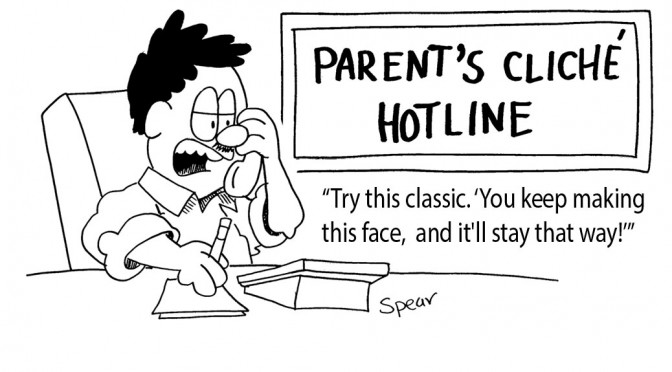
In my own writing, I try to avoid clichés (like the plague, right). For a new client, I explained that removing or replacing clichés was part of my standard level of service, and she stopped me immediately (damn, another adverb). Clichés are part of her style. They’re part of the way she speaks and she wants her little expressions in her written work, too.

 Speartoons, Inc. is licensed under aCreative Commons Attribution-NonCommercial-NoDerivs 3.0 Unported License.
That made me think about clichés, and alter my opinion. Really, they’re a form of jargon. Words can have more than one meaning, and any phrase, sentence or longer writing works on several levels. It conveys the literal message, as well as memories and associations. That’s how advertising works—by associating a word, a message or an image, or a combination of them, with positive feelings. “Buy this stuff and you’ll be happy.”

We can think of clichés as our modern social jargon. Jargon does more than convey a specific meaning within a narrow group: it identifies the speaker or writer as someone in the know, part of the club. Current slang and clichés serve the same purpose. They tell the audience that the user is up to date, part of the in crowd. Using last year’s slang is also dangerous—it tells the audience you’re out of date.

In fact, using a cliché well may be the most efficient way to achieve your communications goal: to get a particular reaction from your audience.

And the way people use quotation marks in writing, or air quotes when the say a well-used phrase, is akin to a bibliographic entry. Quotation marks essentially mean that the words they contain are not the writer’s original work, but someone else’s. The writer or speaker who uses them is giving credit, or at least, admitting they’re using another person’s expression.

Maybe there is room in the professional, credible publishing world for description, for using clichés and words other than “said.” If we all follow the same style conventions, isn’t all writing going to seem the same? Isn’t diversity what we want?

Have I blown my credibility out of the water by daring to support that pariah of the writing world, the cliché? By arguing against Elmore Leonard?

“That’s just the way I roll,” I thought suddenly.

Monday, July 07, 2014

Microsoft Word versus Apple Pages—A comparative review

Creative Commons
Occasionally, you have to hand it to the dark side. For years, over a decade, in fact, I’ve known and acknowledged that Microsoft Word is the best word processor.

I did not want to acknowledge that, though. I wanted there to be something better than the market leader and de facto standard. But my latest experience in publishing my latest book has only reinforced that conclusion.

I used OpenOffice's word processor and then Pages to write the book, which were fine when the goal was producing an e-book. I found Pages especially useful in that I could use it on both my desktop Macintosh and my iPad.

But when it came to formatting the book for print, well, using OpenOffice is downright aggravating, and Pages lacks some of the feature essential to producing a professional grade printed book.

My reaction to Pages

Pages is a light and easy to use application. It only costs $19.99 from the App store, and the iPad version is only ten bucks. On the other hand, Word for the Mac can only be had as part of the Microsoft Office, which costs $139 for the Home version, or $99 per year for the Web-based subscription.

One of Pages' productive feature is the way that it automatically saves your new files and updates in iCloud. This made it simple to switch between using my desktop computer in my office and my iPad while mobile. 

Pages’ user interface is characteristically clean and inviting on the desktop computer. The iPad version, though, features a shade of orange that I, personally, don’t like.

I reached the iPad version's limits quickly. It’s almost impossible to format paragraphs using the ruler at the top of the screen. I don’t know if my fingers are too thick and blunt or what, but the only way I could change the paragraph indents was to enlarge the view to at least 200 percent, and even then, it difficult to select the icons to move the margins.

Also, there doesn’t seem to be a Styles feature in the iPad version, where I can set the typeface, font size, paragraph spacing and other typographical features for blocks of text and headlines and change them with one command. This is standard in full featured word processors.

Finally, the major limitation on both the mobile and desktop versions of Pages is the lack of a facing pages feature. It just doesn’t seem to have entered the programmers’ minds.


What I need for print layout

Formatting an e-book is relatively simple compared to print output , because much of the format of the e-book is determined by the e-reader device. Sure, you can choose typeface and whether paragraphs are double-spaced or indented on the first line. But when you go to print, there are many aspects beyond those that you have to control.

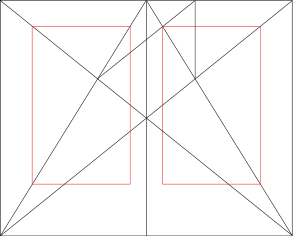
When laying out a printed book, you have to consider the page spread—two facing pages, left and right. If you look at a professionally produced book, especially a textbook, you’ll see that the page layout elements are mirrors of each other. For example, if the page number (“folio” in old book layout parlance) is on top right corner of the right-hand page, it will be in the left corner of the left-hand (even-numbered, if you do it right) page.
The page spread. Image courtesy Wikipedia.

Word has a simple means of allowing this: you just check “Different Odd & Even Pages” when formatting the Header or Footer.

Without this, you could put your page numbers in the centre of the header (top) or footer (bottom) of the page. But you cannot set your document to have the book title on the right hand pages and your name as the author on the left. There’s just no way to do that in Pages.


What I like about Word

Word offers everything you could ask for in a word processor: typing aids, a fully featured Styles menu, control over every aspect of not just wording, character style and page layouts, but also output to .pdf and e-pub format.

I can use Pages, but I have to use work-arounds. For instance, if I want to save the document in a format (like .doc) so that a non-Mac user can share it, I can’t just Save As a .doc. Instead, I have to Export a copy of the file. That means I now have two separate files, which leads to version control problems.

Just use the .doc version from then on, you say? Easy enough with Word, or most other programs. But the people at Apple have taken a bizarre approach. It will open the files with the .doc filename extension, but convert it on the spot to .pages format. Saving it in Word format requires saving it first as a .pages document, then Exporting it again to Word format. It’s not a big deal, but it is an extra step that gets annoying.
Workarounds. Image Creative Commons

Word is a big, expensive program with more features than any one person will ever use. But it does give me all the tools that I need for electronic and print publishing. For that reason, it will have to remain my word processing choice.

Monday, April 28, 2014

My 15 favourite proofreading tips

Don’t you just hate it when you see a typo in work you’ve just published, posted on a website or sent to a client?

Creative Commons image: Wikihow
Every writer needs to learn how to proofread. As a professional editor for over 30 years, I have a few favourite techniques for effective proofreading. Here are some, plus a few ideas I picked up from some other professionals.

1. Plan for proofreading. Set aside a number of hours in your schedule. Proofreading is a step as essential as researching, outlining or drafting. Never send your work to an audience without checking it over. Set aside enough time to allow you to proofread your work more than once. 

2. Leave it alone. When you re-read your own work, you often don’t see what you actually wrote — you see what you intended to write. Put the document aside overnight, if you have the time. Leaving some time between writing and proofreading will help you spot the keystrokes you  did not intend to make.

3. Post a list over your desk of words you often misspell, and the conventions for the document — whether you’re using Canadian, British or US spelling; acceptable short forms; units of measure; whether you use the Oxford comma or spaces around em dashes, and so on — that could change from one project to the next.

4. Proof once on-screen. Take advantage of the spelling checker function of whatever word processor you use. Look for the wiggly red lines and fix the errors they identify. 

5. Don’t depend on the spelling checker. It can’t tell whether you meant form when you typed from, and it doesn’t always know when you typed its when you should have typed it’s. 


6. Don’t depend on your on-screen proofreading. We don’t read words on screen in the same way that we do on paper, so you’ll find different kinds of errors — and miss different errors, too — depending on which medium you use. Print out your document and read it on paper.

7. Proof BIG. One of my favourite proofreading techniques is to print out the document at large size, twice as big as you would normally. When I was a magazine editor back in the days of waxed paper galleys, we would copy our 8 x 10 inch pages onto double-size ledger paper (11 x 17 inches). The mistakes would practically jump onto your face. If your printer can’t handle large-format paper, you can still print out your document with 18-point type. You’d be amazed at the difference.

8. Use a brightly coloured pen to mark the errors. If you use a graphite pencil, it’s harder to see the corrections you made when you’re entering them into the computer file.

9. Read it backwards. This will take your attention away from the meaning of the text, and reduce the tendency to fill in errors with your intentions.

10. Read it aloud. Hearing the wrong word reinforces reading it.

11. Read headlines and sub-headings in a separate pass. I find that the errors that I miss are often in display text, which seems counter-intuitive, as this is larger and more visible than body copy. After you’ve read and re-read the body, go back and pay close attention to only the display text.

12. Review different elements separately. Take another pass through the document to proofread image captions, tables, page headers and footers, call-out text, etc.

13. Take another pass to review numbers, facts and the spelling of names.

14. Read  it over once more, just to make sure.

15. Get someone else to do it. Someone unfamiliar with the text will find more errors more quickly than the author.

What’s your favourite proofreading technique? What’s your most common error?

Thursday, April 03, 2014

Writing tips: Persuade by making it matter to your audience

Image credit: http://www.brandingstrategyinsider.com/2014/03/10-keys-for-brand-persuasion-and-change.html#.UyXBv61dXJ4

You can’t persuade an audience with unproven ideas, nor can you fire one up without appealing to their values.

Read this opening to a seminar on secure information technology practices and then answer this question: do you care?

“Why is security important to us? Because the effectiveness of our programs, activities and services depends on the level of trust our partners have in us. Central to that trust is rigorous stewardship over our digital and physical assets...”

The statement is true, as far as it goes. But for the average worker, it’s not compelling. There are too many steps between the proposition and the audience’s own life.

Image courtest Flixlist 
Someone else, working for an organization that I don’t work for, won’t trust our website as much? Holy spam, Batman! Let’s get to that IT security seminar now!

Better: “Why is IT security important to you? Because without taking these precautions, you risk exposing confidential organizational or even personal information that could be used in fraud.”

Remember what people value

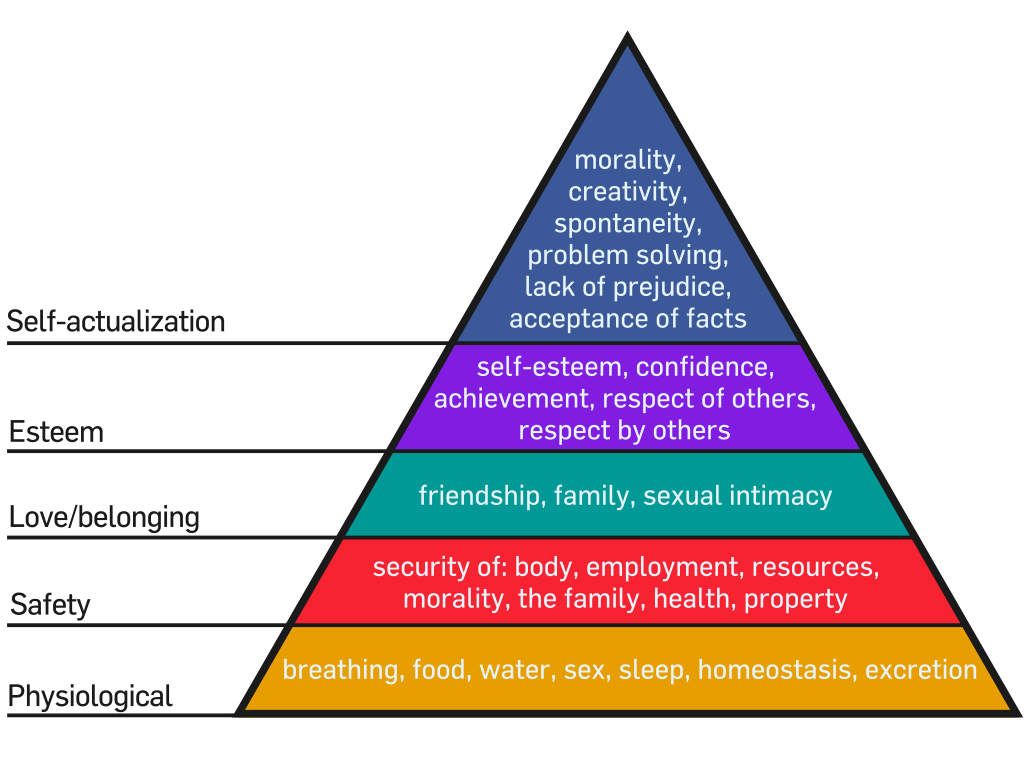
Whenever I have to write something persuasive, I like to recall Maslow’s hierarchy of needs. If you’re not familiar with it, follow the link, but basically, Abraham Maslow studied people and their behaviour, and organized common motivators into a hierarchy. The lower or more basic the desire, the more powerful. Maslow also stated that humans do not, generally, focus on higher needs until they’ve fulfilled the basic ones.
Wikimedia commons

So if we want to motivate people, we have to make sure we’re evoking those basic, animal needs: food, warmth, security, belonging, esteem. A job may supply those things, so promoting the employer’s success can work. Anything that contributes to the bottom line is persuasive to the extent that the audience believes the employer’s success is critical to their own.

The incidence of fraud, identity theft and other crimes facilitated by the Internet proves that people feel IT security is pretty distant from their own needs — until they get stung by some kind of scam.

The path from the IT department’s guidelines to your own security isn’t obvious, but it is real. Our job as communicators is to clear that path.

How to make it matter

Here is a suggested outline you can adapt the next time you have to get a group to buy into something important, but new or abstract to them.
  1. Start with an example — like “Erica bypassed the spam filter and filled out this sensitive information on a website. Then the information was published and her employer fired her.”
  2. Explain the problem and summarize the solution — like “Erica did not verify that the form she filled out was actually on the website of the organization she thought it was. She should have made sure that the URL had a lock symbol and began with https://”
  3. Broaden or generalize the problem — use more examples from the audience’s own workplace or experience. Make them as realistic as possible.
  4. Explain the problem, the consequences and the solutions fully. Keep the language clear and simple. Use active sentences so that the audience can follow the guidelines.
  5. End with more realistic examples — “If you encounter x, do y.” Provide solutions that the audience can use right away.


Make change less scary and difficult
Image courtesy TanveerNaseer.com

Change is hard, because it opens us to the unknown. If you want to persuade an audience to change the way they work — or do anything, for that matter — you have to prove to the audience that it’s important to them (not to you), and you have to make accomplishing a change as easy as possible.

Do you have an experience to share?

Have you been to a seminar or read a document that tried to explain how important something was, but failed because you still didn’t care afterward? Tell us all about it in the Comments.

Thursday, January 09, 2014

The whole story and nothing but the story

Photo: Satiray in Flickr. Creative Commons License
While I post book reviews regularly on this blog, I decided years ago not to publish a negative review of a book by an independent author. I also promised never to publish a positive review unless I really meant it. My reviews are candid, and while I hope to promote independent authors, I won’t lie about a book’s quality. I just will not review a book I don’t think is good. I don’t see the point in tearing down a book by an author who is probably struggling as hard as I am to sell books. I would rather spend my time promoting deserving authors.

While I have read many excellent author-published books, the one I’m currently reading, which I will call “the book” for the rest of this post, disappoints me. It was written by a best-selling, independent author who has done a lot to promote the credibility self-published authors.

I expected an engaging story, but instead, I found a frustrating one. Getting through this story is like wading knee-deep through adjectival phrases, similes and adverbs.

Take this example (with key words changed to disguise the identity):
Bernard von Bauben saw her before he was halfway across the lobby. Mary Lynn was sitting in an overstuffed lavender chair beside the Baby Grand Piano, dressed in mauve and lace, smiling at him. Von Bauben walked immediately to her, and she stood and kissed his cheek. Her lips were warm, and von Bauben saw a fire burning deep within the coloration of her eyes.

Or this one:
The Elite Apartments were cloaked in peace and solitude as they were advertised to be. From the outside, only a dozen or so lights were visible in the windows, and the faint sound of a radio playing Scott Joplin’s ragtime disrupted the stilted silence of a day fading into night. 
As he climbed out of the car, Brent Haymire thought he glimpsed a nervous rustle of curtains on the third floor, and he wondered if someone was up there watching him. In his line of work, there were eyes everywhere. General Tom Regan often accused him of being stricken with an acute case of paranoia. Maybe he was imagining things. Maybe not. The mind did have a habit of playing tricks sometimes. But the subconscious was also the best warning system that man possessed, and Haymire knew that, thus far, his paranoia, real or imagined, had managed to keep him clear of those sordid things, legal and ominous, that go bump in the night.
 Good grief! Anyone with the slimmest grasp of English could cut those passages in half without losing any information.

Combine that with the number of times the author dedicates two paragraphs to describing a scene or a feeling, then does it again three pages later, and you can imagine my reaction:

“Get on with the story!”

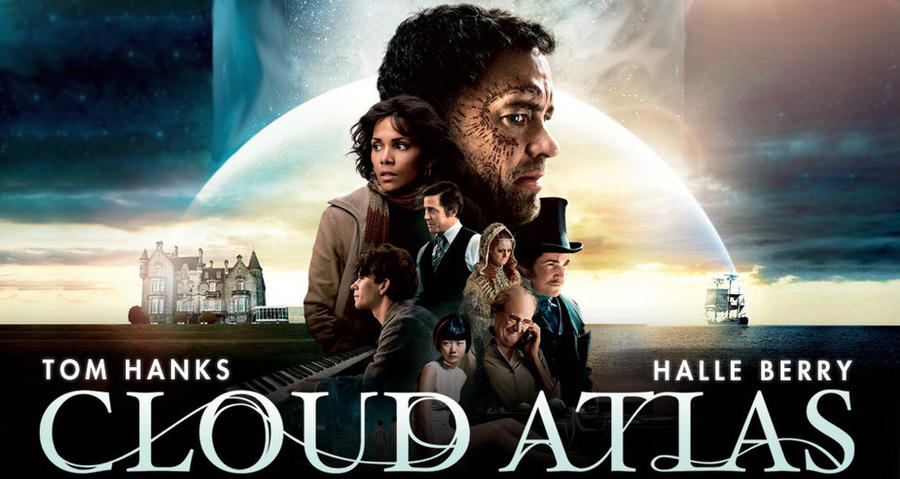
Coincidentally, I watched Cloud Atlas on DVD last night. (Okay, so I still use obsolete technology. I also listen to a transistor radio when I work out.) That movie disappointed me, too, for a similar reason: the writers were more focused on their own writing cleverness than on telling the story.

Cloud Atlas banner by CochiseMFC
Cloud Atlas was based on a novel with a great reputation (I haven’t read it, and I don’t think I will, now) and had a strong cast, but failed to tell the story. The novel features six “nested” stories that begin in the south Pacific in 1850, move through the 20th century to a dystopian and post-apocalyptic future, then goes back to the beginning. Each story is interrupted at a crucial point by the next story, which picks up a character or an object from the previous one. It was a clever idea that earned the author a lot of praise for his writing skills.

I think that the movie’s writers tried to be as clever, and ended up creating something so complex as to be baffling. Instead of nesting six different stories, the movie jumps around from story to story quickly, with no apparent reason and no apparent pattern, other than beginning and ending with the post-apocalyptic story of Zachry — in effect, turning the novel’s structure inside-out.

The cast, which included Tom Hanks, David Broadbent, Halle Berry, Hugh Grant, Hugo Weaving and Susan Sarandon, had roles in most, if not all of the stories. This was more of a distraction than an addition, especially with actors changing gender or race — Halle Berry as a Jewish refugee in 1935, or Doona Bae as a Korean clone in 2144 as well  the daughter of an American slaver in 1850. I found myself saying “Oh, that’s Tom Hanks with a skin wig and a beard and heavy makeup!” or “Hey, that’s no lady! That’s Hugo Weaving in drag and a blond wig!” Worst, I had to look up the cast on my iPad. “Is that Roger Daltrey? No, it’s Hugh Grant with a curly wig and old-guy makeup!”

Nearly three hours later, I could not see the movie’s point. I think the directors and writers tried to make a statement with the actors playing different roles in different stories, but what that statement was, I cannot tell.

The most important part of any story: the audience
The filmmakers behind Cloud Atlas and the author of the book that disappoints me spent far too much time admiring their own abilities, and not enough asking whether they’ve connected with their audience.
Image courtesy Creative Commons

What do you think? Did you watch Cloud Atlas? Did you read the novel? Have you ever read a book that seemed to have more to do with showing off the writer’s abilities than telling a story to a reader? Tell us all about it in the comments.

Thursday, August 29, 2013

How to write a report I will read

My last post focused on fiction: how to write a novel I would enjoy reading.
There are far more people in the world who have to write other kinds of documents: letters, proposals, memos, instructions, report — which may or may not be fictitious.

These writers also need some guidance, at least to judge from many of the reports I have to read. So here are a few tips on how to write a report that I will be able to read.

1.   Start at the end

Get to the point immediately. No one reads reports for pleasure. They want to know “what’s in this for me?”

Start with your more important point: what does this report mean? In other words, the conclusion. State that up front. In fact, write it down first.
Think of writing your report as taking a road trip. What’s the first thing you do? You enter the destination into MapQuest (or Google Maps, or whatever). You find out exactly where it is and you get directions from where you are now.

Your conclusion, which should be the thesis statement of your report, is your destination. Now, you need to work out how to get there.

2.   Get a GRIP

Regular readers will know my copyrighted formula to writing: Goal, Idea, Reader and Plan

Goal — Your purpose. Why are you going to your destination? What will you do when you get there? In terms of writing, what result do you want from this report? It could be to change a policy in the workplace, or it could be to inform colleagues about safer working procedures. Whatever it is, have a clear idea about it. If you have trouble clarifying the purpose, answer this question: what do you want the reader(s) to do after they finish reading the report?

Reader — Whom is this report for? Who are they, specifically? What interests them? What motivates them? Why should they care about what you have to say?

Idea — Your main message, your thesis statement, the most important thing you have to say. Sum up your whole report into one grammatically correct sentence. If you can’t do that, you cannot make your point clearly to anyone else.
Image from Jamie Rubin, science-fiction author
http://www.jamierubin.net/2012/08/07/going-paperless-5-tips-for-how-a-paperless-lifestyle-can-better-capture-some-everyday-interactions/

Plan — This is your MapQuest/Google directions to the conclusion. A map has two main points: starting and destination. Now, your audience is uninformed, or at least not as aware of all the information you have. Where you want them to be is responding according to your Goal statement.

Typically, you need to present facts, show the links and relationships among them, and demonstrate to the readers why these are important. Tell the reader how the facts and links affect their job or life. 

For example, if you want to cause change in your organization, you will have to show how the current situation costs more money (or time, which is the same thing) than it has to. You have to demonstrate this is a pressing problem, or imminent threat to safety, employee morale or bottom-line profits. Then you have to demonstrate how your conclusion will solve all those problems.

3.   Write backwards

Write the conclusion first. That will put your destination, your main point, clearly at the top of your mind. And it will show you how to get there.
Then write the persuasive information that will bring your readers there. Follow your outline. Don’t skip anything. Fill in all the information your readers will need to accept your conclusion and take the action you want them to take.

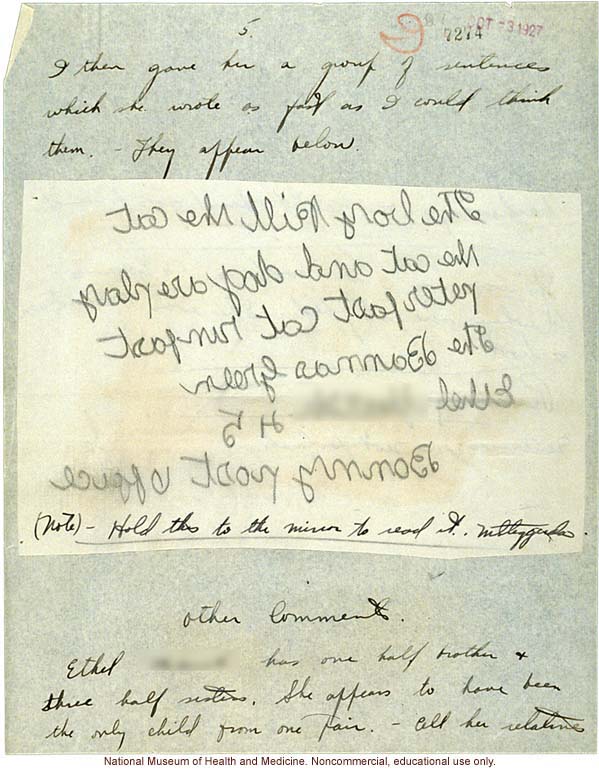
National Museum of Health and Medicine. Educational and non-commercial use only.
Write the introduction last. State the problem (if there is one) and summarize your conclusion.

If you’re going to summarize anything, you have to have the full statement written out first. It’s far more difficult to say something succinctly first, then extend it to a full argument.

It’s like that old statement that’s been attributed to Mark Twain, Samuel Pepys, Oscar Wilde and many more: “Sorry to write you such a long letter; I didn’t have time to write a short one.”

4.   Control quality

Avoid jargon and business terms like “going forward,” “institutional arrangements,” “at the end of the day” or “outside the box.” These are emptyphrases. Just write what you mean.

Eliminate empty words and phrases that don’t add information. Replace noun phrases with verbs. Keep your sentences active (see my post on Writers Get Together).

And before you deliver your report to the audience, edit it. Go over it again. Watch out for clichés and vague thinking, as well as downright mistakes. Was the number supposed to be 51 or 15 cases of ammunition? Did that shipment arrive on February 8 or August 2?

5.   Proofread it one more time

It can’t hurt, and you may just catch something egregious. Better yet, have someone else read it over. You can’t proofread your own stuff.

Follow these guides, and you’ll have a much easier time writing a document that will have the results that you want.

Questions? Ask in the Comments section below.


Good luck!

Friday, April 05, 2013

Writing tips: Words to throw away


“Edit” often is synonymous with “take out.” A lot of the work I do involves highlighting unnecessary text and pressing the Delete key.

It’s a tough job.

In order to make it easier (and you all want my work to be as easy as possible for me, don’t you?), I thought I would warn you against writing those words in the first place. If they aren’t there, I don’t have to cut them.

I have two categories in this post: words and phrases you can just remove without replacing; and phrases you can easily replace with a single word.


Terms to tank

It’s time to ditch some catch-phrases. Maybe the first time you heard them, they sounded cool. But here is my list of words and phrases that no one should say, let alone write down, anymore:


Push the envelope

Outside the box


Going forward, when it means “in the future”


High-level


On the ground, unless you mean something that is actually on the ground


At the end of the day


In the field of


It is to be noted that


The information you requested is below


This report/letter/email is in reference to


In light of this


The month of


In a nutshell


Obese text

Working for a large organization, I read a lot of text written in what I call “corporatese” — a language that obscures and hinders communication of ideas more than facilitating it. Documents filled with extra words and phrases that don’t add information, but just bloat the word count.

The next time you find that you’ve written any of these phrases, replace them with a single verb. Then re-read the text. You’ll be amazed at how much better it reads.

Conduct the evaluation of — replace with “evaluate”

During the period of — “between”


Cognizant of/aware of — “know”


At a later date — “later”


First and foremost — “first”


Due to the fact that — “because”


In reference to — “about”


There are a lot more, but you get the idea. When you see a noun phrase — a group of words that convey the same meaning as a single word — replace their lazy asses with that single hard-working word.

Suggest more terms to tank in the Comments.

Thursday, November 22, 2012

Writing Tip: The Sentence, Part 1


Brain structure: emw/Creative Commons
 Lately, I’ve been reading a lot of work that shows severe problems with sentence structure. Whether in fiction or non-fiction, it’s almost as if the writers do not understand what a sentence is.

For example:

An analysis of survey results conducted by GHI concluded that different groups of consumers face different kinds of challenges, this includes unemployed and underemployed as well as low-income groups.
 Or the opposite problem, exemplified in this case in fiction:

The chattering of Will’s teeth, as loud as the cold north wind that blew down through mountains.
The problem in the first case is a comma splice: joining two separate sentences with a comma, rather than separating them with a period (or maybe a semi-colon).

Freeimages.co.uk
In the second example, the problem is an incomplete sentence. Something is missing — a verb. This is how a grammatically complete sentence would read:

The chattering of Will’s teeth was as loud as the cold north wind that blew down through mountains.

That’s not a particularly creative solution, but it’s correct.

Another example, with some light surgery to hide the actual source:

But back to the economy, all three projects expanded simultaneously and required capitalization, no wonder the organization’s bottom line was depleted.

The unit of expression

Think of the sentence as your basic unit of expression. A word may be a unit of meaning, but a single word by itself does not usually express an idea.


Back when I was in grade school, after cleaning the sabre-tooth tigers’ litter boxes, we all learned that a sentence expressed a single complete thought. To do that, it needs two elements: a verb or predicate — action — and a subject, which is usually a noun or a pronoun.

Creative Commons
The quick red fox jumps.

The action word, the verb, is “jumps.” “Fox,” of course, is the subject. The rest of the words describe the subject.

Sometimes, you don’t need the subject to be written out: “Duck!” The subject is “you, implied” — a concept that caused all sorts of confusion when I was in school.

That’s it: noun and verb. Other words just describe the subject or complete the action. End it with a period.

A wave of lust slammed into her body.
Just “lust slammed” would be a grammatically complete sentence.

The subject can also be a phrase or a clause: a group of words that function together as a noun.

Resisting the temptation to crush her body against his and tear off her clothes took all his willpower.
The subject in that example did not end until after “clothes.” (And “after clothes” is one of my favourite places.)

That’s all there is to it. To write clearly, write about something doing something.

Joining complete thoughts

To join two complete thoughts — sentences — you have to have the right kind of link. Usually, it’s not a period, but a word or a group of words. I won’t go into the formal grammatical expression here; if you read good writing, you’ll develop a sense of what “sounds” right.

Here are some examples of what not to do, and corrections. Again, these are taken from real sources, but doctored slightly so as to keep the guilty hidden until they can redeem their sins.

Run-on sentence

The run-on sentence happens when one complete idea follows another without any punctuation or joining phrases.

Image Wikipedia Commons
She got up and went into the bathroom and got a wet washrag and came back and laid it across her mother’s forehead.
There are more than one problem with this example. The succession of clauses joined by “and,” while grammatically correct, gets tedious. There’s also way too much detail. You don’t need to describe every single action: your reader can figure out the intervening actions.

She wet a rag in the bathroom and laid it across her mother’s forehead.

Not that I minded I can curse with the best of them, as you’ve probably noticed.

Not that I minded; I can curse with the best of them, as you’ve probably noticed.

Comma splice

Another common error is joining two related sentences with a comma instead of a semi-colon.
She took his hand again, “how are we going to keep them safe?” She whispered.
Again, there are more than one problem here:

She took his hand again. “How are we going to keep them safe?” she whispered.
“If we move quickly we could be off in front of the soldiers, we’ve got fast horses and money.”
“If we move quickly we could get ahead of the soldiers — we’ve got fast horses and money.”

“The horses need to rest tonight, so do we.” Gianni replied.

“The horses need to rest tonight, and so do we,” Gianni replied.
 

A matter of style?

Wikipedia Commons
Who cares, though? As long as the underlying meaning comes across, does grammar really matter?

Yes. First of all, using grammar correctly, especially such a basic concept as understanding what a complete sentence is, is a necessary but not sufficient indicator of professionalism. Whether you’re writing fiction, advertising or technical reports, if you don’t come across as professional, no one will take your document seriously. And if the audience doesn’t believe you, why bother writing?

Clarity is even more important. Consider this:

For hospitals seeking increased profitability in the operating room (OR) it is essential to streamline the movement of materials from suppliers to the hands of doctors efficiently acquiring and moving supplies critical to OR procedures are measurable ways to reduce costs, increase revenue capture, optimize labour and improve process management.
What’s efficient: doctors’ hands, or moving supplies?

When the subject is medical care, I think clarity is pretty darn important.

What do you think? Having trouble with sentences? Ask a question or leave a comment!